
Before you check out: please leave one valid serial number (S5W-xxxxxx-xxxx) in the message area for each update. A serial number can only be updated once. The update from V6 to V7 is free.
Don't have a license yet? This listing is an update for existing V6 owners only. If you are new to the software, you need the full S5 for Windows® programming system instead.
New in Version 7
- OsciCAM®
- Statusrecorder
- LogView
- Intelligent input assistance
- Online to a SIMATIC S5 via SINEC L2
- Online to a SIMATIC S5 via H1
- Calling of the STEP 5 COM packages on Windows XP, Windows Vista, Windows 7, Windows 8 and Windows 10 (32 and 64 bit)
Windows 11 compatible. S5 for Windows® V7 runs on Windows 11 (64 bit).
S5 for Windows®
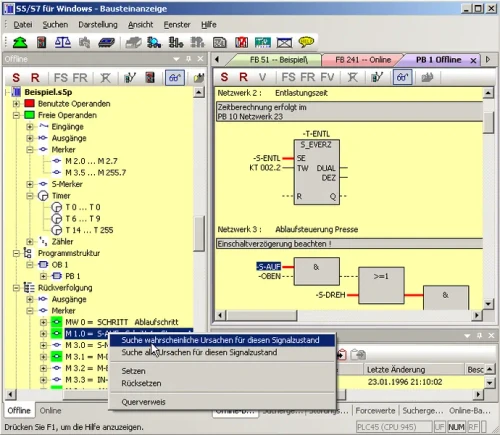
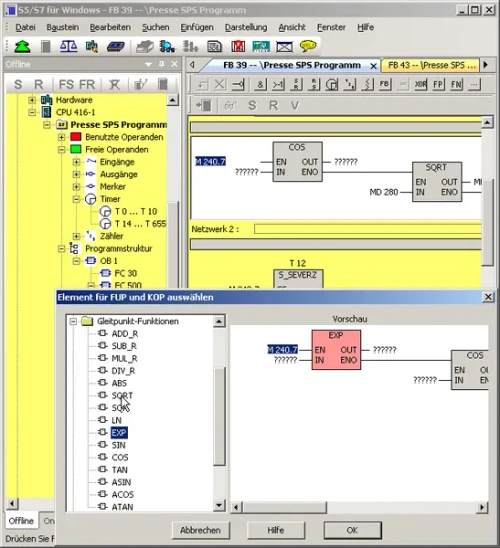
S5 for Windows® provides the tools for creating, modifying, testing and documenting programs for programmable logic controllers (PLC). It is designed for programming the Siemens SIMATIC S5 family with STEP 5, using Function Block Diagram (FBD), Ladder Diagram (LAD) and Statement List (STL) as presentations. Existing S5 programs can be edited directly with no import or export step. The software is compatible with the original Siemens programming unit, and the S5 Doctor functions are integrated for automatic troubleshooting.
OsciCAM®
Analyze motion processes by synchronizing previously recorded video with process signals. Recorded video plays in sync with process signals and a time stamped record of PLC block status.
Statusrecorder
Explore dynamic procedures by reviewing block status frame by frame after the fact. The Statusrecorder logs block status with a time stamp and lets you switch between STL, CSF and LAD during review.
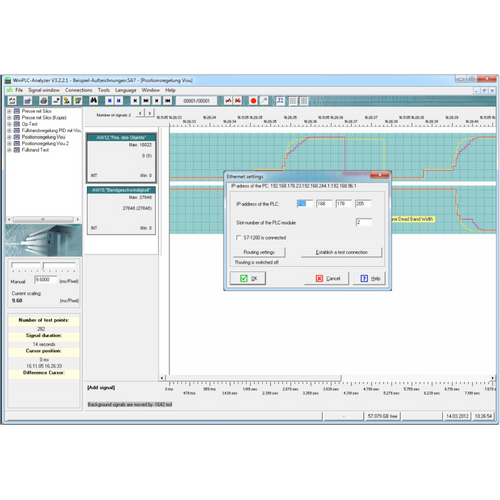
Integrated oscilloscope
The oscilloscope feature extends the diagnostic capability of the programming system. Dynamic processes are monitored and analyzed in an integrated screen modeled on an oscilloscope front panel. Pointing at I/O signals with a virtual test probe is enough to monitor several signals at once inside the virtual oscilloscope, and recording can be stopped at any point to investigate the timing of a machine fault.
Beyond I/O signals, the state of local variables at a defined position in program execution can be watched by pointing the test probe at the variable in block status, which is only possible because the oscilloscope is built into S5 for Windows. Recorded data can be saved for later investigation, for archiving, or to send by email.
Editor and symbolic tables
- Integrated editor for creating and editing symbolic tables, with search, replace on any criteria, rewiring and a built in syntax check.
- Multiple segment editor for statement lists, function block diagrams and ladder diagrams, including complex functions, built for ease of use with the mouse, the keyboard, or both.
- Cross references and the corresponding symbol files are shown with the correct addresses, and the symbol file can be edited in the same window.
- Allocation of new addresses with syntax check is integrated.
- The Windows clipboard can be used for program or configuration changes anywhere in the project.
- Statement lists can be converted to function block diagram or ladder diagram wherever they are displayable, and FBD or LAD can always be displayed as a statement list.
Status display and communication
Multiple segments can be shown in the status display across statement list, function block diagram and ladder diagram. The CPU status function reports on the interrupt stack, block stack and system data. S5 for Windows also allows COM packages to be called, and communication to a PLC can be established using a USB-S5-Adaptor.
G5 step sequence programming
G5 for Windows® step sequence programming, now included within S5 for Windows, is a tool for programming sequential steps (sequencer control) inside a STEP 5 program. A step sequence programmed in a step sequence block (SB) is made of steps and transitions, where the transition logic enables the following step. The graphical editor supports linear sequences, alternative branching, simultaneous branching and jumps.
- Step types: steps are displayed as boxes and differentiated as initial, permanent or selective. The initial step starts the sequence unconditionally, the instructions of a permanent step always execute even when the step flag is inactive, and the instructions of a selective step are skipped when the step flag is inactive.
- Transitions: displayed as lines. The following step runs only when the transition logic is true, and a simultaneous branch can open up to eight further steps.
- Timing: every step except the initial step can be assigned a waiting time (delay timer) or a monitoring time (watchdog).
- Compatibility: compatible with the Siemens GRAPH 5 and GRAPH 5/II programming packages, so the standard Siemens function and step blocks are required (FB70/71 with SB0, FB72 with SB2, FB73 with SB3).
- Working view: the logic of the selected step or transition is shown in a separate window and can be edited in Ladder logic (LAD), Control System Flowchart (CSF) or Statement List (STL). The logic window is resizable, and the corresponding symbolic library can be displayed and edited at the same time.
- Display: the graphical display of steps and transitions can include comments, step box size adjusts to the comments used, the status display matches the editor layout, and active or corrupted steps are specially indicated.
Other updates
- S5/S7 for Windows® V7 update – if you hold V6 licenses for both S5 and S7, update both together here. Checkout requires both serial numbers, S5W and S7W.
- S7 for Windows® V7 update – the equivalent update for the S7-300 and S7-400 programming system.